

Download Portadi – Secure Cloud Access Management Tool
Overview of Portadi – Cloud Access Management Made Simple
Portadi is a cloud‑based access‑management platform that consolidates every online account—personal, professional, or team‑based—into a single, easy‑to‑navigate dashboard. Unlike traditional identity‑and‑access solutions that demand deep IT expertise, Portadi is built for anyone who needs to share or restrict access without exposing passwords. Whether you’re a small business owner juggling Slack, Google Workspace, and QuickBooks, or a remote team needing controlled entry to SaaS tools, Portadi lets you assign precise permissions, audit activity, and revoke access instantly.
The interface is clean, the onboarding wizard walks you through linking each cloud app, and the permission matrix is visual, so you always know who can see what. By eliminating password sharing, Portadi reduces the attack surface, helps maintain compliance, and speeds up onboarding of new team members. It also supports both personal and work accounts, making it a versatile companion for freelancers who use the same suite of tools across multiple client projects.
In short, Portadi turns the chaos of multiple usernames and passwords into a streamlined, secure, and auditable workflow that anyone can manage.
Key Features of Portadi – Secure Shared Access Without Passwords
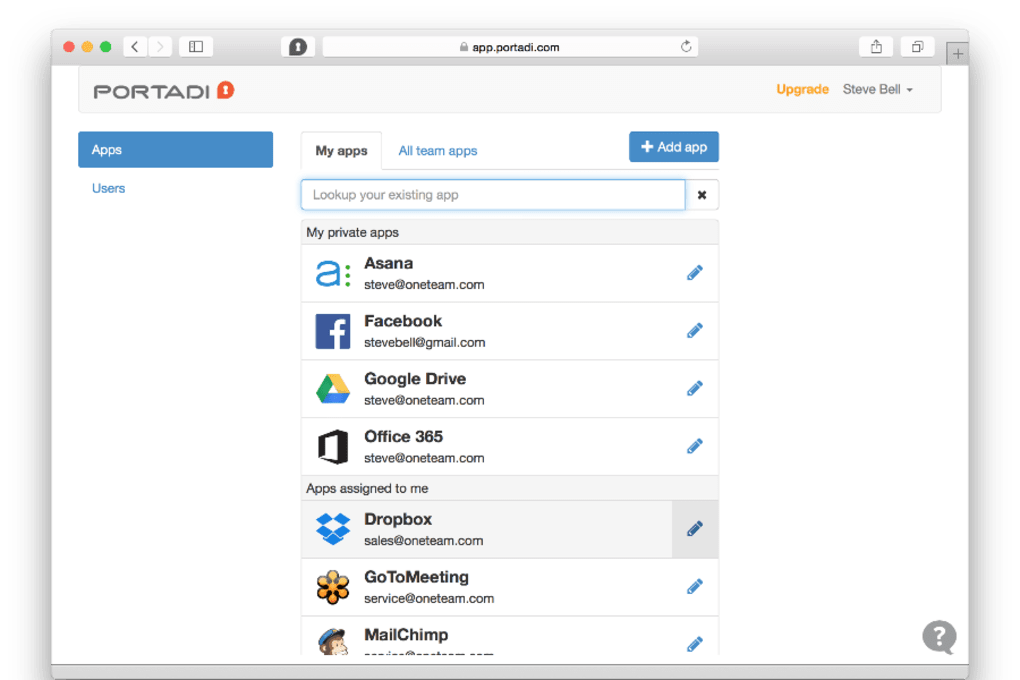
- Unified Dashboard: View every linked cloud application—Google Workspace, Microsoft 365, Salesforce, Trello, and more—from a single pane.
- Granular Permission Controls: Assign read, write, admin, or custom roles per user per app, ensuring each team member sees only what’s relevant.
- Password‑Free Sharing: Generate secure access tokens that let collaborators log in without ever revealing the original password.
- Real‑Time Activity Log: Monitor who accessed which app, when, and what actions were taken, supporting audit trails and compliance reporting.
- One‑Click Revocation: Instantly remove a user’s access across all connected services with a single toggle.
- Multi‑Factor Authentication (MFA) Integration: Layer additional security by requiring MFA for high‑privilege accounts.
- Cross‑Platform Support: Available as a web app and native clients for Windows, macOS, Android, and iOS.
- Automated Provisioning: Sync with directory services (Azure AD, Okta) to auto‑populate users and groups.
- Custom Branding: Add your company logo and colors to the login portal for a seamless user experience.
- Secure Cloud Storage: All configuration data is encrypted at rest and in transit, meeting GDPR and CCPA standards.
Installation, Setup, and Compatibility – Getting Started on Windows, macOS, Android & iOS
Portadi is delivered as a SaaS solution, so the core software lives in the cloud and requires no local installation for the majority of users. However, native clients are available for those who prefer desktop or mobile shortcuts.
Step‑by‑Step Installation
- Create an Account: Visit Portadi.com and sign up with your corporate email. A verification link is sent to confirm ownership.
- Verify Your Domain: For work accounts, add a TXT record to your DNS to prove domain control. This enables single‑sign‑on (SSO) integration.
- Connect Cloud Apps: Use the built‑in connector gallery. Click “Add Application,” select the service (e.g., Google Workspace), and follow the OAuth flow to grant Portadi read/write permissions.
- Invite Team Members: Upload a CSV of email addresses or invite users individually. Assign them to pre‑defined roles or create custom ones.
- Download Native Clients (Optional): For Windows, download the .exe installer; for macOS, grab the .dmg file. Android and iOS apps are available on their respective stores. Install and log in with your Portadi credentials.
Supported Operating Systems
- Windows 10, 11 (64‑bit)
- macOS 12 Monterey and later
- Android 8.0 Oreo and later
- iOS 13 and later (iPadOS included)
- Web browsers: Chrome, Edge, Firefox, Safari (latest versions)
After installation, the first‑time launch walks you through a quick tutorial that demonstrates how to create an access token, share it with a teammate, and monitor the activity log. Because the backend runs in a secure, ISO‑27001‑certified data center, you never need to manage patches or server updates—Portadi handles them automatically.
Pros, Cons, FAQ, and Final Verdict – Should You Download Portadi?
Pros
- Eliminates password sharing, reducing security risk.
- Intuitive UI suitable for non‑technical users.
- Granular permission settings for each cloud app.
- Real‑time audit logs help with compliance.
- Cross‑platform availability (web, desktop, mobile).
- Automated provisioning integrates with existing identity providers.
Cons
- Advanced features (e.g., SSO, MFA) are locked behind higher‑tier plans.
- Initial domain verification may be confusing for small teams without a dedicated IT person.
- Relies on internet connectivity; offline access is not possible.
Frequently Asked Questions
Is Portadi free to use?
Portadi offers a free tier that supports up to five users and three cloud applications. Premium plans start at $9.99 per user per month and unlock unlimited apps, SSO, and advanced reporting.
Can I revoke access without affecting the original account?
Yes. Access is granted through temporary tokens, not the actual password. Revoking a token instantly blocks the user’s entry while the underlying account remains unchanged.
Does Portadi store my passwords?
No. Portadi never stores raw passwords. It uses OAuth or API‑based integrations, and any credentials are encrypted with AES‑256 before being transmitted.
Is there a mobile app for managing access on the go?
A native Android and iOS app are available. They provide the same dashboard, token generation, and activity logs as the web version, optimized for small screens.
How does Portadi help with compliance (GDPR, CCPA)?
All data is encrypted in transit and at rest, and audit logs can be exported in CSV or JSON format for regulatory reporting. The platform also supports data‑subject request workflows required by GDPR and CCPA.
Conclusion & Call to Action
Portadi strikes a rare balance between simplicity and enterprise‑grade security. For teams that are tired of password‑sprawl, it offers a clean, password‑free sharing model that anyone can adopt without a steep learning curve. While the free tier is generous enough for small startups, growing organizations will quickly see value in the premium features—especially SSO, MFA, and unlimited app integrations. If you’re looking to centralize cloud access, improve auditability, and reduce the risk of credential leaks, download Portadi today and start a 14‑day trial. Experience a smoother onboarding process, tighter permission control, and peace of mind knowing your cloud assets are managed securely from a single dashboard.
Portadi delivers a user‑friendly approach to cloud access management that feels both modern and secure. The token‑based sharing eliminates the need for password exposure, and the real‑time logs keep administrators in control. Minor drawbacks like limited free‑tier capacity are outweighed by the robust feature set.



.png)



